
Qatar SIM Not Working? Common Problems and How to Fix Them
No signal, no OTP, or a SIM that suddenly stopped working? The real causes in Qatar, from QID registration to unpaid bills, and the quickest fix for each.
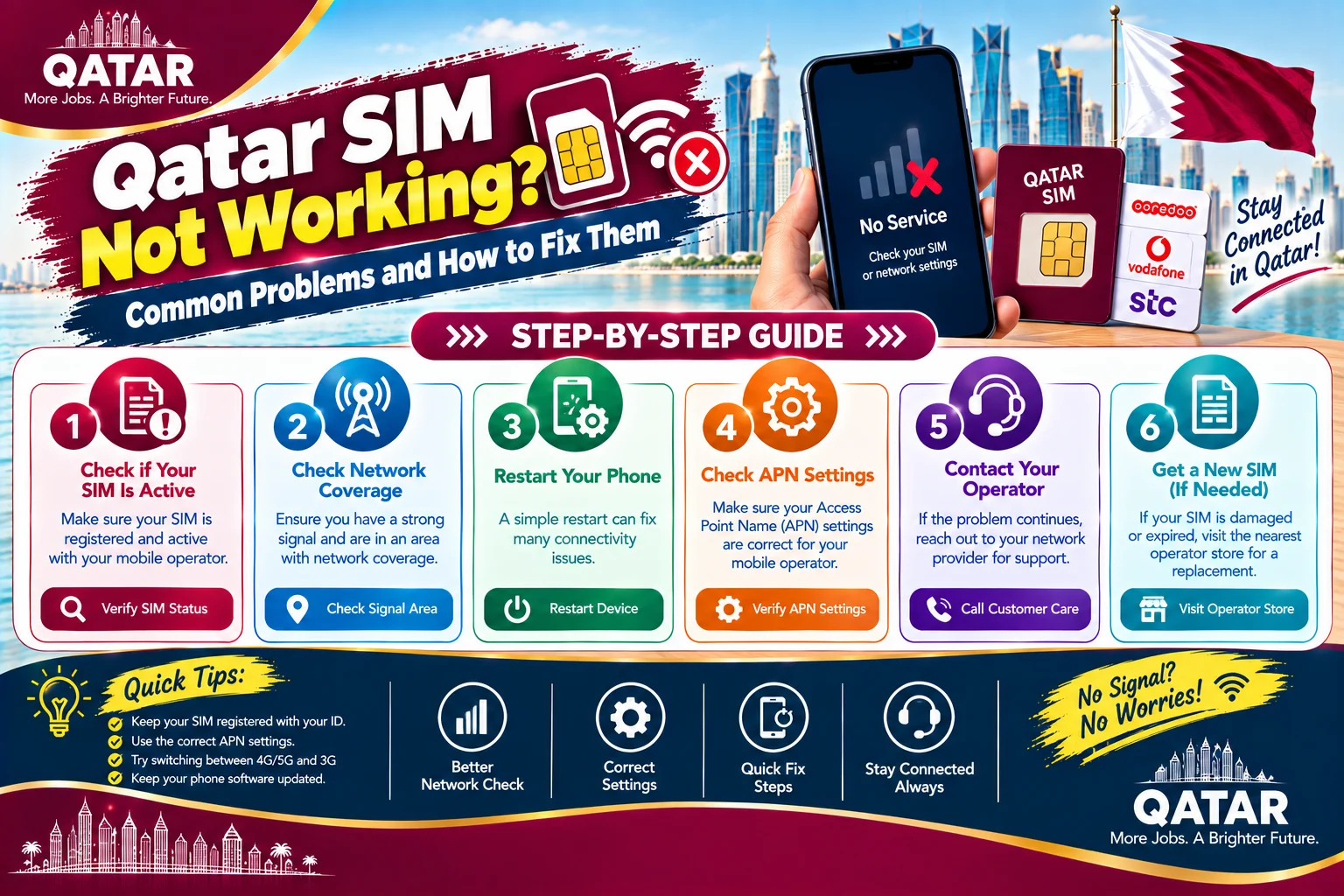
If your SIM stopped working in Qatar, the cause is almost always one of five things: a registration problem tied to your QID or passport, an unpaid bill or expired balance, a phone setting, a damaged or inactive SIM, or a network fault in your area. Most of these take under an hour to fix once you know which one you are dealing with. This guide walks through each cause in the order you should check it, so you do not waste a trip to a store or a long wait on hold.
A working number matters more here than in most countries. Your bank sends OTP codes to it, the Metrash app depends on it, and delivery, ride-hailing, and even some building access systems use it. That is why a dead SIM feels like an emergency, and why it is worth fixing properly instead of guessing.
Quick answer: what to check first
- Restart your phone, then turn airplane mode on for 30 seconds and off again.
- Look at the status bar. If it says No Service or Emergency Calls Only, the problem is usually registration, billing, or the SIM itself, not your phone.
- Open the Ooredoo or Vodafone app and check your balance, bill status, and line status.
- Confirm the number is registered under your own valid ID, and that the ID has not expired.
- Put the SIM in a different phone. If it works there, the problem is your handset settings.
Work out which kind of problem you have
The symptom tells you where to look, so spend a minute on it before you do anything else. If you have no signal at all, the issue is the SIM state or the network. If you have signal but cannot make calls, the line is probably barred for billing or registration reasons. If calls work but mobile data does not, look at your data plan and phone settings. If calls and data work but you never receive text messages, the issue is usually SMS settings or a registration mismatch. And if the SIM worked fine until a specific date and then stopped, suspect an expiry: a balance, a validity period, a visitor SIM, or your ID.
Registration problems tied to your QID or passport
Qatar requires SIM registration against a valid ID, and this is the most common hidden cause of a SIM that stops working. Prepaid SIMs can generally be activated with either a QID or a passport, but postpaid lines need a QID, and a visitor SIM that expires has to be converted using a QID to continue service. If the name on your passport does not match the name on your entry visa or QID exactly, a registration can be rejected or flagged later.
Your ID status matters too. If your QID expires or your residence permit is cancelled, your provider can restrict the line because the identity behind it is no longer valid. Vodafone's own terms note that when a family plan owner's QID is cancelled, the numbers under that account can go through the standard disconnection process. If your line stopped working shortly after a job change, a resignation, or a QID expiry, this is the first thing to rule out.
The fix is simple but needs you in person or in the app: bring your original QID or passport to an Ooredoo or Vodafone store, ask them to check the registration status of the number, and correct any mismatch. If the ID is the problem, renew it first. Our guide on what to do when your Qatar ID has expired covers that step.
Postpaid bills, prepaid expiry, and barred lines
Money is the second most common cause. On postpaid, an unpaid bill usually leads to outgoing calls being barred first and then full suspension. On prepaid, running out of balance stops calls and data, and letting the validity period lapse can deactivate the number. Both operators show your status in their apps, so check there before you visit a store.
Deactivation is not always permanent, but the window is limited. Ooredoo's terms say a number that is terminated, cancelled, or expired is placed in quarantine for 180 days. During that time you can often recover it by paying what you owe and asking for reinstatement. After that, the number can be reassigned to someone else, and you cannot get it back. If your number matters for banking or work, act early.
Phone settings that cause No Service
If the SIM works in another phone, the problem is your handset. Work through these in order, because each one is quick and they fix the majority of cases.
- Set network selection to Automatic. A phone stuck on a manually chosen network will show No Service even when coverage is fine.
- Switch the preferred network type between 5G, 4G, and Auto, then back. Some handsets lose the connection when they cannot hold a 5G signal.
- Remove the SIM, wipe the gold contacts gently with a dry cloth, and reinsert it firmly. Dust and small bends cause more failures than people expect.
- Install any pending system update. Carrier settings often arrive with updates.
- As a last resort, reset network settings. On an iPhone this is under Settings, General, Transfer or Reset iPhone, Reset. On Android, look for Reset Wi-Fi, mobile and Bluetooth under system or reset options. This clears saved Wi-Fi passwords, so note them first.
If you bought your phone abroad, also check that it is not carrier locked to a network that does not operate in Qatar. A locked phone will accept the SIM and then refuse to connect.
Damaged SIMs, eSIM problems, and replacements
A cracked, bent, or water-damaged SIM cannot be fixed, only replaced. Bring your QID to a store and ask for a replacement. The number stays the same, and the old SIM is deactivated. If your phone supports it, you can ask about switching to an eSIM instead. Ooredoo lets you swap a physical SIM to an eSIM through its app, by WhatsApp, or in a store.
eSIMs have their own failure mode. If you factory reset a phone and did not transfer the eSIM first, the profile can be erased, and the activation QR code is usually single use. In that case you need the provider to issue a new one. Do the transfer or backup step before you reset, wipe, or sell a phone.
No OTP messages: the problem that breaks everything else
A number that works for calls but never receives OTPs causes the most stress, because it locks you out of your bank and government apps at the same time. Check these causes in order:
- Dual SIM phones send and receive SMS on a default SIM. If your Qatar number is not the SMS default, codes can go to the wrong place.
- A full message inbox or a blocked sender list can stop codes from arriving.
- Poor signal or a stuck network connection delays messages. Restart and try again.
- The number is not the one linked to your ID. Metrash and many banks send codes only to the number registered under your own name. A SIM registered to your employer will not receive them. Our Metrash troubleshooting guide explains how to link the right number, and our guide to Hukoomi and Tawtheeq registration problems covers the same problem for government portal logins.
Test it by asking a friend to text you. If a normal message arrives but the OTP does not, the problem is on the sender's side or the registration, not your phone.
Real problems people run into
- My bill or home internet is the problem, not the SIM. See our guides to telecom complaints and home internet problems.
- My SIM stopped working the day after my QID expired. This is the ID-status issue above. Renew the QID, then ask the store to reactivate or re-verify the line.
- The kiosk registered my SIM under the salesperson's name. Go back to a store with your ID and ask for the number to be transferred to you. Do this before you link it to your bank.
- I changed phones and nothing works. Check that the SIM is seated properly, that the new phone is unlocked, and that APN and network settings are on automatic.
- My company line was cancelled when I resigned. Company lines belong to the employer. Get a personal line in your own name and update your bank and app numbers.
- My tourist SIM expired and I now live here. Convert it to a resident plan with your QID before the number is lost.
- Data works on Wi-Fi but not on mobile. Check that mobile data is on, that you have not hit a plan limit, and that data roaming settings are not blocking the connection.
When to contact support, and what to say
If the steps above do not fix it, contact your provider. Ooredoo customer care is on 111, and it also answers on WhatsApp at 4414 1111. Vodafone is on 111 and through live chat in the My Vodafone app. Have your number, your ID details, and a short description ready: what the symptom is, when it started, and what you already tried. Ask for a ticket number so you can follow up without repeating yourself.
If the provider does not resolve a genuine service problem, you can escalate. The Communications Regulatory Authority regulates telecom services in Qatar and is the body to approach after you have used the provider's own complaint process.
How to avoid SIM problems later
Renew your QID well before it expires, keep your contact details current, and never register a personal line in someone else's name. Set up automatic payment for postpaid bills, and check your prepaid validity date. If you are leaving the country, cancel your line properly and clear any balance, because an unpaid bill can follow you. Our first week in Qatar checklist shows where SIM setup fits, and our guide to opening a bank account explains why your number should be in your own name before you link it to banking.
Frequently asked questions
Why is my SIM card not working in Qatar?
The usual causes are a registration problem tied to your QID or passport, an unpaid bill or expired balance, a phone setting such as manual network selection, or a damaged SIM. Check your line status in the Ooredoo or Vodafone app first, then test the SIM in another phone.
Why does my Qatar SIM say Emergency Calls Only?
It usually means the line is suspended or barred, often because of an unpaid bill, an expired balance, or a registration issue, or that your phone cannot connect to the network. Test the SIM in another phone and check your account status in the provider app.
Can I use a Qatar SIM without a QID?
Prepaid SIMs can generally be activated with a passport, but postpaid lines require a QID, and a visitor SIM that expires has to be converted using a QID to continue service.
Why am I not receiving OTP messages on my Qatar number?
Common reasons are a dual SIM phone using a different default SMS SIM, a full inbox, poor signal, or a number that is not the one registered under your ID. Metrash and many banks send codes only to the number registered in your own name.
How do I replace a lost or damaged SIM in Qatar?
Bring your QID to an Ooredoo or Vodafone store and ask for a replacement. The number stays the same and the old SIM is deactivated. If your phone supports it, you can ask about an eSIM instead.
How long does Ooredoo keep my number after it expires?
Ooredoo's terms say a number that is terminated, cancelled, or expired goes into quarantine for 180 days. You may be able to recover it in that window by settling what you owe, but after that it can be reassigned.
Sources & references

Agha Ali Abbas
Founder & Editor
More on Guides
Explore everything you need to know about qatar guides.
Related articles
Your First Week in Qatar: The Complete Checklist
Exactly what to do in your first seven days in Qatar, from your Qatar ID and SIM card to the real problems new arrivals run into and how to fix them.
Qatar ID (QID): Renewal, Replacement, and Everything Else to Know
When to renew your Qatar ID, what it costs to replace a lost one, and what actually happens if you let it expire.

How to Get a Driving License in Qatar: New or Exchanged
Whether your home country license qualifies for a direct exchange or you need to sit a Qatari driving test, here's the actual process, documents, and cost.